
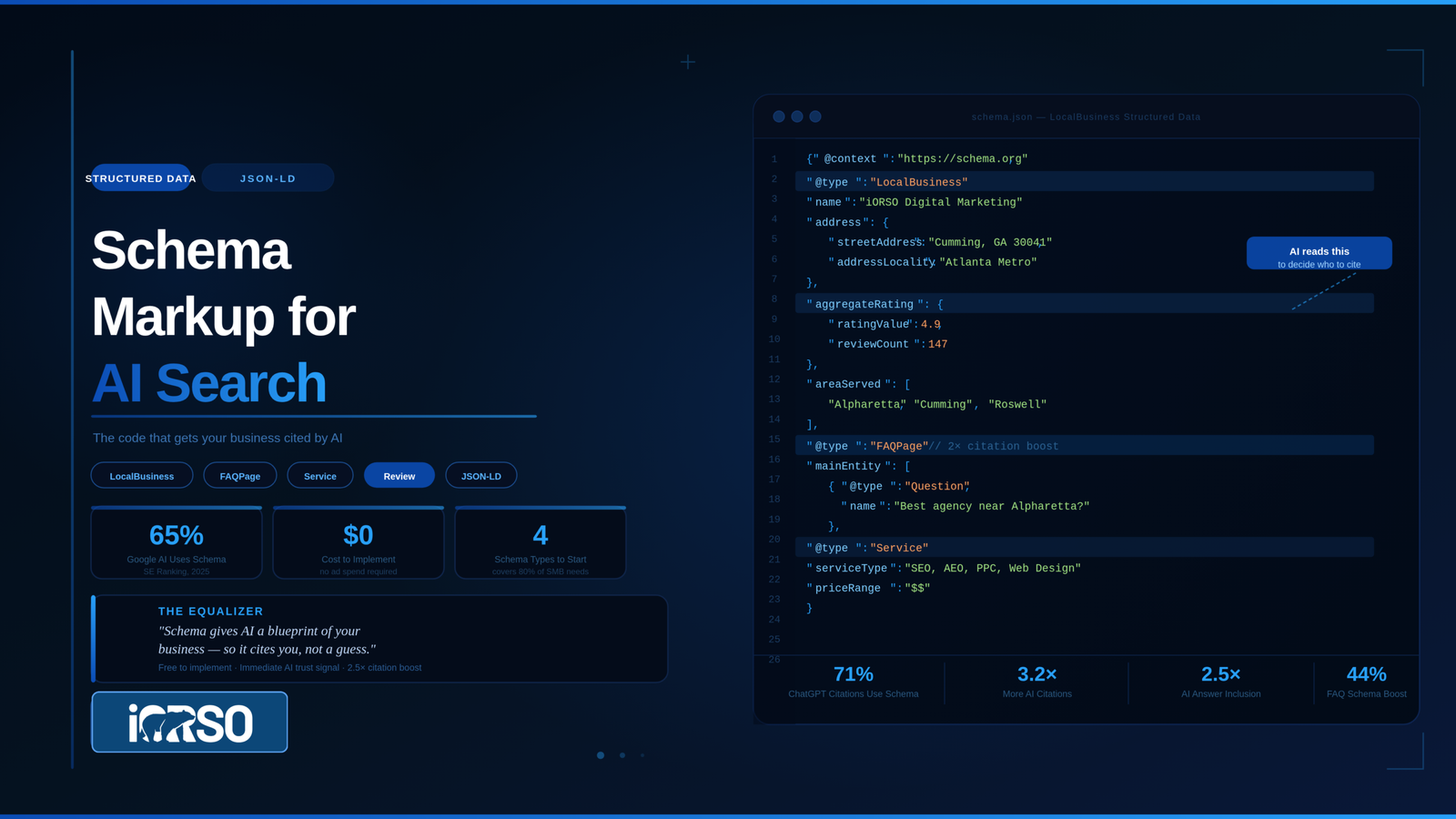
Schema markup is code added to your website that tells AI systems exactly what your business does, where you operate, what you charge, and what customers think of you. 71% of pages cited by ChatGPT include structured data, and 65% of pages cited by Google AI Mode use it, according to SE Ranking research. Without schema, AI has to guess what your content means. With schema, you hand AI a structured blueprint it can read, trust, and quote.
for Small Businesses competing against larger companies with bigger marketing budgets, schema markup is one of the most effective equalizers in AI search. It costs nothing to implement, requires no ongoing ad spend, and directly increases your chances of appearing in AI-generated answers by 2.5x.
What Schema Markup Does
Think of your website as a conversation. Without schema, AI systems read your pages the way a stranger reads a letter in a foreign language: they can pick up some meaning, but they miss context, relationships, and specifics. Schema translates your content into a format AI systems read natively.
When you add LocalBusiness schema to your site, you are telling ChatGPT, Google, and Perplexity: “This is a business called [name], located at [address], serving [area], offering [services], with [X] reviews averaging [Y] stars, charging [price range].” The AI does not have to infer any of this from your paragraphs. It reads it directly from the structured data.
Google confirmed in April 2025 that structured data gives a search results advantage. Microsoft confirmed in March 2025 that schema markup helps its AI (Bing Copilot) understand content for citations. These are not theoretical claims. The two largest search companies have stated on the record that schema influences how their AI systems select sources.
Schema Markup Quick Facts
- ChatGPT citation rate: 71% of pages cited by ChatGPT use structured data (SE Ranking)
- Google AI Mode citation rate: 65% of pages cited by Google AI Mode include schema markup (SE Ranking)
- Citation multiplier: Sites with proper schema are cited 3.2x more often in AI responses (BrightEdge)
- AI answer inclusion: Content with correct schema markup is 2.5x more likely to appear in AI-generated answers (Stackmatix)
- FAQ impact: Pages with FAQ blocks and structured data saw a 44% increase in AI search citations (BrightEdge)
- March 2026 update: Google’s core update shifted schema from a display trigger (rich snippets) to an AI trust and entity verification signal
- Format: JSON-LD is the only recommended format for AI search in 2026
The Four Schema Types Every Small Business Needs
Google supports dozens of schema types, but four cover approximately 80% of what a local service business needs. Start with these before expanding to supplementary types. Each schema type serves a different purpose in how AI systems evaluate your business. Together, they form the structured data foundation that AI uses to decide whether to cite you.
LocalBusiness Schema
LocalBusiness schema identifies your business as a real entity with a physical presence. It communicates your name, address, phone number, service area, business hours, reviews, and pricing range in a format every AI system can parse instantly.
This is the foundation for local AI visibility. A dental practice in Dunwoody with complete LocalBusiness schema (including geo coordinates, service area, aggregate rating, and opening hours) gives AI systems every data point they need to recommend the practice when someone asks “dentist near Dunwoody GA.” Without this schema, the AI has to scrape the practice’s About page and hope the information is formatted clearly enough to extract.
Service Schema
Service schema defines the specific services your business offers. For a business that provides multiple services, each service can be declared with its own name, description, service area, and pricing. This is how AI systems know that your HVAC company in Marietta offers both installation and repair, that installation starts at $4,500, and that you serve a 30-mile radius.
Service schema is especially valuable for businesses with services that overlap with other industries. “Restoration” could mean art restoration, water damage restoration, or automotive restoration. Service schema eliminates that ambiguity for AI.
FAQPage Schema
FAQPage schema wraps your FAQ content in a structure that AI can extract as pre-packaged question-and-answer pairs. This is the highest-value schema type for AI citations because it matches the exact format AI systems use to generate answers: a user asks a question, and the AI pulls a direct answer.
A personal injury law firm in Buckhead with FAQPage schema containing “How much does a personal injury lawyer cost in Atlanta?” with a direct answer including specific fee structures gives ChatGPT and Google AI Overviews an answer they can cite word for word. Without the schema, the AI may find the information buried in a paragraph and paraphrase it less accurately, or skip the page entirely.
Article/BlogPosting Schema
Article schema identifies blog posts and content pages as authored, dated editorial content. It tells AI who wrote the article, when it was published, when it was last updated, and what the headline is. Authorship signals matter more in 2026 than at any point in the previous decade: when an Article schema declares a named author, AI systems cite it with 94% confidence compared to 61% for anonymous content, according to upGrowth research.
Every blog post on your site should have Article or BlogPosting schema. The investment is minimal (one JSON-LD block per post), and the citation benefit is measurable.
How Schema Stacking Works
Individual schema types help, but the real power comes from stacking multiple schemas on a single page. Schema stacking tells AI systems how different entities on your page relate to each other.
A service page for an Atlanta roofing company should carry a stack of four schemas: LocalBusiness (the company), Service (roofing), FAQPage (the FAQ section at the bottom), and BreadcrumbList (the page’s position in the site hierarchy). These are combined in a single JSON-LD block using the @graph structure, where each schema references the others through dedicated @id identifiers.
BreadcrumbList is worth calling out specifically. It helps AI understand your content hierarchy. When your blog post includes breadcrumb schema showing “Home > Blog > Schema Markup,” AI systems use that path to understand your content’s place in your overall topic structure. Research from upGrowth shows breadcrumb schema improves citation likelihood by 1.8x because AI recognizes your content as part of an organized, authoritative site rather than a disconnected page.
At iORSO, our Bridge platform deploys schema stacks to every page on client sites. On our own site, we deployed schema to 30+ pages, moving from zero structured data to full LocalBusiness, Service, and FAQPage stacks across every key page. This is the same system we run for every client engagement. See our full results and site-wide quality scores.
What the March 2026 Google Update Changed
Google’s March 2026 core update produced the most significant shift in structured data strategy since rich snippets were introduced. The update changed what schema is valuable for.
Before March 2026, schema primarily triggered rich results: star ratings, FAQ dropdowns, and how-to carousels in Google search results. After the update, Google tightened rich result eligibility (FAQ rich result impressions dropped by nearly half across tracked sites) and increased the weight of schema as an entity verification signal for AI Mode answers.
The practical impact: schema no longer just makes your listing look better in Google results. It makes your content more trustworthy to AI systems deciding which sources to cite. Sites with clean, accurate entity schema saw measurably improved citation rates in Google AI Mode answers following the update. Schema that accurately describes content increases the probability of an AI citation even when no traditional rich result is displayed.
Common Schema Mistakes That Hurt AI Visibility
Mismatched Schema and Content
If your schema says your business hours are 9-5 Monday through Friday, but your website says 8-6, AI systems flag the inconsistency and lose confidence in your data. Every data point in your schema must match what is visible on the page. After Google’s March 2026 update, AI systems actively cross-reference schema claims against visible content.
Missing Required Fields
A LocalBusiness schema without geo coordinates, or a Service schema without a service area, leaves gaps that reduce AI confidence in your data. Incomplete schema is sometimes worse than no schema because it signals unreliability. Google’s Rich Results Test flags missing required fields with specific error messages. Run this test on every page before deployment, and fix every error before moving to the next page.
Template Schema Without Customization
Some WordPress themes and SEO plugins auto-generate generic schema that lacks business-specific details. A LocalBusiness schema with placeholder values (“Your Business Name,” “123 Main St”) is worse than none because it introduces false data into the AI’s understanding of your entity. Audit auto-generated schema and replace placeholder values with accurate information.
Excessive or Abusive Schema
Adding FAQ schema to pages that do not have visible FAQ content, or using Review schema on editorial pages, is now penalized after the March 2026 update. Schema must describe the primary content purpose of the page. Supplementary schema on off-topic sections no longer qualifies for rich results and can reduce AI trust signals.
A Schema Implementation Plan for Small Businesses
You do not need to implement everything at once. This four-week plan prioritizes by impact.
Week 1: Audit and fix. Run Google’s Rich Results Test on your top 10 pages. Identify pages with missing, broken, or placeholder schema. Fix validation errors on existing schema.
Week 2: Deploy foundation. Add LocalBusiness schema to your homepage and contact page. Add Service schema to each service page. Ensure every schema references your business entity with a consistent @id identifier.
Week 3: Add FAQ and Article. Add FAQPage schema to service pages and GEO pages that have FAQ sections. Add Article or BlogPosting schema to every blog post with author, date, and headline fields.
Week 4: Stack and connect. Add BreadcrumbList schema to every page. Combine all schemas into @graph blocks. Validate the entire site again. Set up ongoing monitoring through Google Search Console’s Enhancements report.
If this sounds like a lot of technical work, it is. Schema implementation is one of the services included in iORSO’s SEO and AEO retainers starting at $1,500 per month. Our Bridge platform handles deployment, validation, and ongoing monitoring automatically.
Example: A Full Schema Stack for a Local Service Business
Here is what a complete schema stack looks like for a home services company in Alpharetta. This stack combines LocalBusiness, Service, FAQPage, and BreadcrumbList in a single @graph block. Each schema references the others through @id identifiers so AI systems understand the relationships between the business entity, its services, and the page content.
The LocalBusiness block establishes the entity: business name, address, phone, geo coordinates, hours, aggregate rating, and service area. The Service block declares the specific service offered on this page (roof repair), its price range, and links back to the LocalBusiness via the provider field. The FAQPage block wraps the visible FAQ section so AI can extract Q&A pairs directly. The BreadcrumbList block declares the page’s position in the site hierarchy. Together, these four blocks give AI systems everything they need to cite this business confidently for queries like “roof repair cost Alpharetta GA” or “best roofer near Alpharetta.”
This is the same stacking structure the iORSO Bridge platform deploys across client sites. The difference is that Bridge generates, validates, and monitors these stacks automatically rather than requiring manual coding.
Frequently Asked Questions
What is schema markup and why does it matter for AI search?
Schema markup is structured data code (JSON-LD format) added to your website’s HTML that tells search engines and AI systems exactly what your content means. It identifies your business, services, pricing, reviews, and location in a format AI reads directly instead of inferring from text. 71% of pages cited by ChatGPT include structured data, making schema one of the strongest AI visibility signals available.
Which schema types should a small business start with?
Start with four types: LocalBusiness (your business identity, address, hours, and reviews), Service (each service you offer with pricing and service area), FAQPage (your FAQ content as structured Q&A pairs), and BreadcrumbList (your site hierarchy). These four cover approximately 80% of local service business needs. Add Article schema to every blog post.
Is JSON-LD better than Microdata for AI citations?
Yes. JSON-LD is the only format Google recommends for structured data in 2026. It separates schema code from your HTML content, making it cleaner for AI crawlers to parse. Microdata embeds schema inside HTML tags, which creates parsing conflicts for AI engines processing rich text. All new schema implementations should use JSON-LD exclusively.
How do I add schema markup to a WordPress site?
Use a schema plugin (Rank Math, Yoast, or Schema Pro) for basic types like Article and BreadcrumbList. For LocalBusiness, Service, and FAQPage stacks, custom JSON-LD blocks injected into the page header produce more reliable results than plugin auto-generation. Always validate output through Google’s Rich Results Test. The iORSO Bridge platform handles WordPress schema deployment and monitoring automatically as part of SEO and AEO retainers.
How do I test if my schema markup is working?
Enter any page URL into Google’s Rich Results Test at search.google.com/test/rich-results. The tool detects all schema types on the page, validates for errors, and flags missing required fields. Run this test before and after every schema deployment. For ongoing monitoring, check Google Search Console’s Enhancements report weekly for validation errors. iORSO’s free AEO Mini-Scan includes a full schema audit as part of the visibility score.
Can I have too much schema on one page?
Yes. Google’s March 2026 update penalizes schema that does not describe the primary content of the page. Adding FAQ schema to pages without visible FAQ content, or Review schema on editorial pages, reduces AI trust signals. Schema must match what the user sees. A dozen accurate, validated schema blocks outperform fifty half-implemented ones spread across template fragments.
What changed with schema in Google’s March 2026 update?
Google shifted schema from a SERP display trigger (star ratings, FAQ dropdowns) to an AI trust and entity verification signal. FAQ rich result impressions dropped by nearly half. But sites with accurate entity schema saw improved citation rates in Google AI Mode. Schema no longer just makes your listing look better in search results. It makes your content more trustworthy to AI systems deciding which sources to cite.
Get Your Schema Audited
Request your free AEO Mini-Scan from iORSO. The scan includes a schema audit showing what structured data your site currently has, what it is missing, and which schema types will have the highest impact on your AI visibility. No pitch, just data. We respond within 24 hours.
To understand the bigger picture of AI search visibility, read our guide to what AEO is and why your business needs it. If you are seeing traffic declines, our breakdown of zero-click search explains why and what to do next.