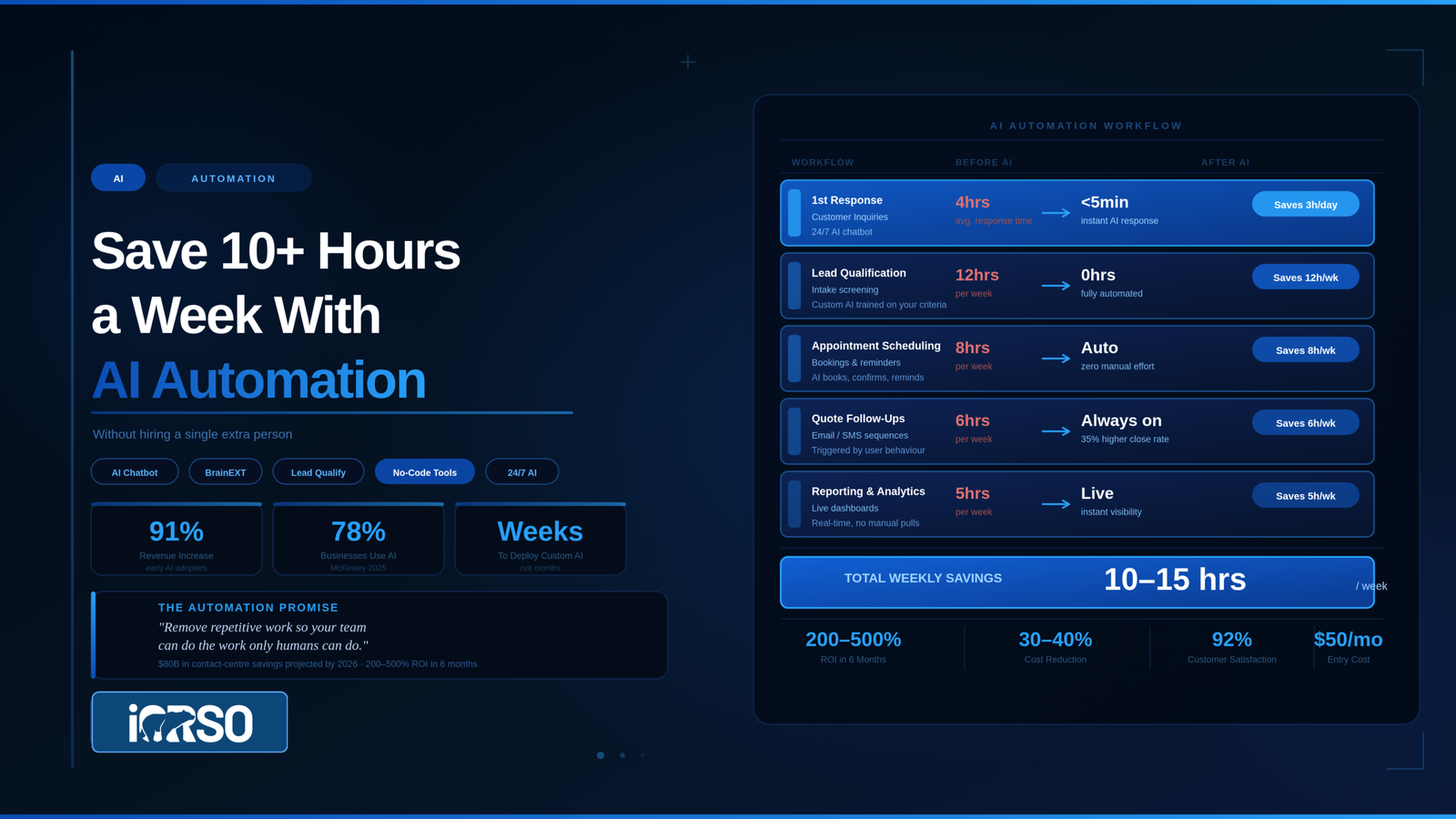
Small businesses that implement AI automation save an average of 10-15 hours per week on repetitive tasks like answering common customer questions, qualifying leads, scheduling appointments, and following up on inquiries. AI chatbots reduce customer service costs by 30-40% according to Freshworks data, and the average ROI for Small Businesses that configure AI automation properly reaches 200-500% within six months. The barrier to entry has collapsed: no-code AI platforms start under $50 per month, and custom AI systems can be built in weeks, not months.
The businesses getting the most value from AI are not replacing their teams. They are removing the repetitive work that prevents their teams from doing the high-value work only humans can do.
The Real Problem AI Solves for Small Businesses
Every small business has a bottleneck that looks the same: the owner and a small team handle everything. Sales, customer service, scheduling, invoicing, follow-ups, quoting. Each task takes 2-5 minutes. Multiply that across 30-50 daily interactions and you lose 10-20 hours per week to work that does not require human judgment.
A law firm in Alpharetta spends 12 hours per week answering the same 15 intake questions by phone and email: “Do you handle my type of case? What does it cost? How long does it take? Do I have a case?” An HVAC company in Cumming spends 8 hours per week fielding requests for quotes, scheduling service calls, and confirming appointments. A dental practice in Roswell spends 6 hours per week on appointment reminders, insurance questions, and new patient onboarding paperwork.
None of these tasks require expertise. They require consistency, speed, and availability. That is exactly what AI does best. (And if these businesses also want AI search engines to recommend them to new customers, that is a different problem solved by Answer Engine Optimization.)
AI Automation Quick Facts
- Cost reduction: AI chatbots reduce customer service costs by 30-40% (Freshworks, 2025)
- ROI timeline: Average 200-500% return on investment within 6 months for properly configured SMB automation (Brothers Automate)
- Customer satisfaction: 92% of customers who interact with AI chatbots report a positive experience (Dante AI)
- Industry adoption: 78% of organizations now use AI in at least one business function (McKinsey, 2025 Global Survey)
- Entry cost: No-code AI automation platforms start under $50 per month
- Labor savings projection: Conversational AI projected to save $80 billion in contact center labor costs by 2026
- Early adopter results: Small businesses using AI automation report 91% revenue increases and 86% improved profit margins
Generic AI Tools vs. Custom AI: The Difference That Matters
Most articles about AI for small business recommend the same list: Zapier, ChatGPT, HubSpot chatbot, Calendly. These tools work for simple automations. They connect apps, send automated emails, and handle basic scheduling. For many businesses, they are a good starting point.
But generic tools hit a wall quickly. A standard chatbot can answer “What are your business hours?” It cannot answer “My basement flooded and I have mold growing under the carpet. Is that covered by homeowners insurance, and should I call you or my insurance company first?” That answer requires business-specific knowledge that no off-the-shelf chatbot has.
Custom AI is built on your actual business knowledge. It is trained on your intake processes, your pricing structure, your service area boundaries, your frequently asked questions with answers specific to your operation, and the decision trees your best employees use when qualifying leads or triaging customer issues. The chatbot does not give generic answers. It gives your answers, in your voice, with your specific policies.
This is the distinction between a chatbot that says “Please call us for more information” and one that says “Based on what you described, that sounds like a Category 3 water damage situation. We can have a technician at your Roswell address within 4 hours for an initial assessment. The assessment is free. Would you like to schedule that now?”
The Five Workflows to Automate First
Not every process is worth automating. The highest-value targets share three characteristics: they happen frequently (daily or multiple times per day), they follow a predictable pattern, and they currently require a human to do something a machine could do equally well. The five workflows below are ordered by typical ROI speed, with the fastest payback listed first. Most small businesses see measurable time savings within the first two weeks of implementing workflow number one.
1. First-Response Customer Inquiries
Every minute between a customer’s inquiry and your response reduces your chance of winning that customer. AI handles the first touch instantly, 24 hours a day, 7 days a week. It answers common questions, collects the information your team needs to follow up, and qualifies the lead before a human ever gets involved. The handoff to your team includes full context so nobody repeats questions.
A realistic split: AI handles 60-65% of initial interactions autonomously. The remaining 35-40% get routed to your team with all qualifying information attached. Review the split monthly and adjust the threshold based on where human judgment adds genuine value.
2. Lead Qualification
Not every inquiry is a qualified lead. AI can apply your specific qualification criteria to every incoming contact: service area (is the address within your coverage zone?), budget range (does the project size match your minimums?), timing (do they need service this week or are they researching for next year?), and fit (is this the type of work you do?). Qualified leads go to your sales team immediately. Unqualified leads receive a polite, helpful response that protects your reputation without consuming team time.
3. Appointment Scheduling and Reminders
Booking, confirming, rescheduling, and reminding. These steps touch every service business and every one of them can run on AI. Integrate scheduling AI with your calendar and CRM so appointments are booked in real time, confirmations go out instantly, reminders are sent 24 hours and 1 hour before the appointment, and cancellations trigger automatic rebooking outreach. One dental practice reported saving 6 hours per week just on appointment management after implementing automated scheduling.
4. Follow-Up Sequences
The follow-up is where most small businesses lose revenue. A prospect fills out a form, gets a call back the next day, does not answer, and never hears from you again. AI follow-up systems send personalized sequences based on the prospect’s inquiry: a same-day acknowledgment, a next-day value-add email (relevant case study, pricing guide, or FAQ), a three-day check-in, and a seven-day final touch. These sequences run automatically for every lead, eliminating the “we forgot to follow up” problem.
5. Internal Knowledge Management
Your best employees carry critical knowledge in their heads: how to handle a difficult customer situation, which vendor to call for a specific part, what the process is for filing a warranty claim. When those employees are out sick, on vacation, or leave the company, that knowledge disappears. AI knowledge bases trained on your internal processes, documentation, and team expertise give every employee access to the collective knowledge of the entire team, instantly.
How iORSO’s BrainEXT Process Works
BrainEXT is iORSO’s process for extracting business knowledge and building custom AI systems. The name is short for Brain Extraction. We interview your team to capture the expertise, decision-making patterns, and processes that live in their heads, then build AI systems trained on that specific knowledge.
Step 1: Discovery and Extraction
We conduct structured interviews with key team members. We document your intake processes, qualification criteria, common customer questions (with your specific answers), pricing structures, service boundaries, and the decision trees your best employees use daily. This is the extraction phase: getting the knowledge out of people’s heads and into a format AI can use.
Step 2: System Design
Based on the extraction, we design the AI system architecture. This includes which workflows to automate, what data sources the AI needs, where the human handoff points are, and how the AI connects to your existing tools (CRM, scheduling, email). We present a roadmap with projected time savings and implementation timeline.
Step 3: Build and Train
We build the AI systems using the extracted knowledge as training data. The chatbot does not learn from the internet. It learns from your team’s expertise. This is why the answers are specific, accurate, and sound like your business, not like a generic bot.
Step 4: Deploy and Refine
Systems go live with monitoring. We track what questions the AI handles well, where it struggles, and which interactions need human routing. Weekly refinements for the first month, then monthly reviews. Most systems reach stable performance by week four.
The starting investment for a BrainEXT extraction and roadmap is $2,500. Full implementation is scoped by complexity based on the number of workflows, integrations, and data sources involved.
Ready to see what a BrainEXT extraction looks like for Your Business? Schedule a free discovery call with iORSO and we will identify the 3 workflows where AI will save you the most time.
Measuring AI Automation ROI
AI automation ROI is straightforward to calculate because the inputs are concrete: hours saved per week, cost per hour of the labor replaced, revenue from leads that would have been missed, and reduction in response time.
A practical example: a home services company in Kennesaw saves 12 hours per week on customer inquiries and lead qualification. At a loaded labor cost of $35 per hour, that is $420 per week or $21,840 per year. Add the revenue from leads captured at 2 AM that previously went unanswered (the company estimates 3-4 additional jobs per month at an average of $1,200), and annual value exceeds $75,000. Against a monthly automation cost of $500-2,000, the ROI is clear within the first quarter.
Track these metrics monthly: hours saved per week, cost per lead (before and after automation), response time (average time from inquiry to first response), lead qualification rate (percentage of inquiries that convert to qualified leads), and customer satisfaction scores. If the AI is not producing measurable improvements in at least three of these five metrics within 60 days, the configuration needs adjustment.
When AI Is Not the Right Answer
AI automation is not the solution to every problem. It works poorly when the task requires genuine empathy (delivering bad news to a customer, handling a sensitive complaint), when the domain changes too rapidly for the AI to stay accurate without constant retraining, or when the volume is too low to justify setup costs. If your business receives fewer than 5 customer inquiries per day, a well-organized email template system might deliver 80% of the benefit at 10% of the cost.
AI also creates risk when deployed without proper human oversight. An AI chatbot that gives an incorrect price quote, promises a service you do not offer, or mishandles a distressed customer can do more damage to your reputation than slow response times ever would. Every AI deployment needs clear escalation rules, regular review of AI responses, and a kill switch for when things go wrong.
Frequently Asked Questions
What is the difference between a generic chatbot and custom AI?
A generic chatbot follows pre-set scripts and answers common questions from a standard knowledge base. Custom AI is trained on your specific business knowledge: your intake processes, pricing, service area rules, qualification criteria, and the decision-making patterns your best employees use daily. Generic chatbots say “call us for more information.” Custom AI gives the specific answer your team would give.
How long does it take to implement AI automation for a small business?
Simple automations (email sequences, basic chatbot, scheduling integration) can be configured in 1-2 weeks. Custom AI systems through iORSO’s BrainEXT process take 4-6 weeks from extraction to deployment. Most systems reach stable performance by the end of the first month. The timeline depends on how many workflows you automate and how many integrations are required.
What does a BrainEXT extraction cost?
A BrainEXT extraction and roadmap starts at $2,500. This covers structured interviews with your team, documentation of your key workflows, and a system design with projected time savings. Full implementation is scoped by complexity based on the number of workflows, integrations, and data sources. Schedule a free discovery call to get a specific estimate for your business.
Which workflows should a small business automate first?
Start with first-response customer inquiries (the highest and fastest ROI), then lead qualification, appointment scheduling, follow-up sequences, and internal knowledge management, in that order. Prioritize workflows that happen multiple times per day, follow predictable patterns, and currently consume human time on tasks that do not require human judgment.
Will AI automation replace my employees?
No. AI handles repetitive, low-decision tasks so your team can focus on work that requires judgment, empathy, and expertise. The most effective model is hybrid: AI handles 60-65% of initial interactions and routes the rest to your team with full context. Your employees become more productive and focus on higher-value work, not fewer in number.
What Happens When the AI gets something wrong?
Every AI deployment needs clear escalation rules, regular review of AI responses, and an override mechanism. During the first month, iORSO monitors AI interactions weekly and refines responses based on where the AI struggles. The system routes uncertain interactions to your human team automatically. Accuracy improves with each refinement cycle.
How do I measure ROI on AI automation?
Track five metrics monthly: hours saved per week, cost per lead (before and after), average response time, lead qualification rate, and customer satisfaction scores. If the AI is not improving at least three of these five within 60 days, the configuration needs adjustment. A home services company in Kennesaw documented $75,000+ in annual value from a $500-2,000/month automation investment.
Start With a Free BrainEXT Discovery Call
Contact iORSO to schedule a free BrainEXT discovery call. We will identify the 3 workflows costing your business the most time and show you what custom AI automation looks like for your specific operation. No pitch, just a clear picture of where AI can help and where it cannot.
For more on how iORSO builds custom AI systems, visit our AI Implementation and Automation page or read about the full BrainEXT process. If you are also interested in getting your business found by AI search engines, our guide to what AEO is explains how AI visibility and AI automation work together.